Before the workshop
Workshop preparation.
Set up the demo project and your coding agent before the hands-on session.
Preparation · 01
Required setup.
Complete these steps before joining the workshop.
-
Install Node.js
Node.js includes npm, which you’ll need for the next step.
-
Install the Playwright CLI
npm install -g @playwright/cli@latest -
Clone the demo webshop
github.com/tlolkema/demo-webshop -
Choose one coding agent that supports skills
If you already use a coding agent, keep using it. For the best results, select its newest capable model.
Optional setup · 02
No coding agent yet?
Set up OpenCode Desktop.
This section is only for users who do not already have a coding agent. OpenCode Desktop lets you use a free model for the workshop without a paid AI subscription.
-
Download and install
Download OpenCode Desktop from the official website, install it for your operating system, and launch the application.
-
Add the project and select a model
Set up the demo webshop in OpenCode Desktop using these three substeps:
Go to the product dropdown.Choose Add project and select the demo-webshop directory.Open the model selector and select a model marked as free.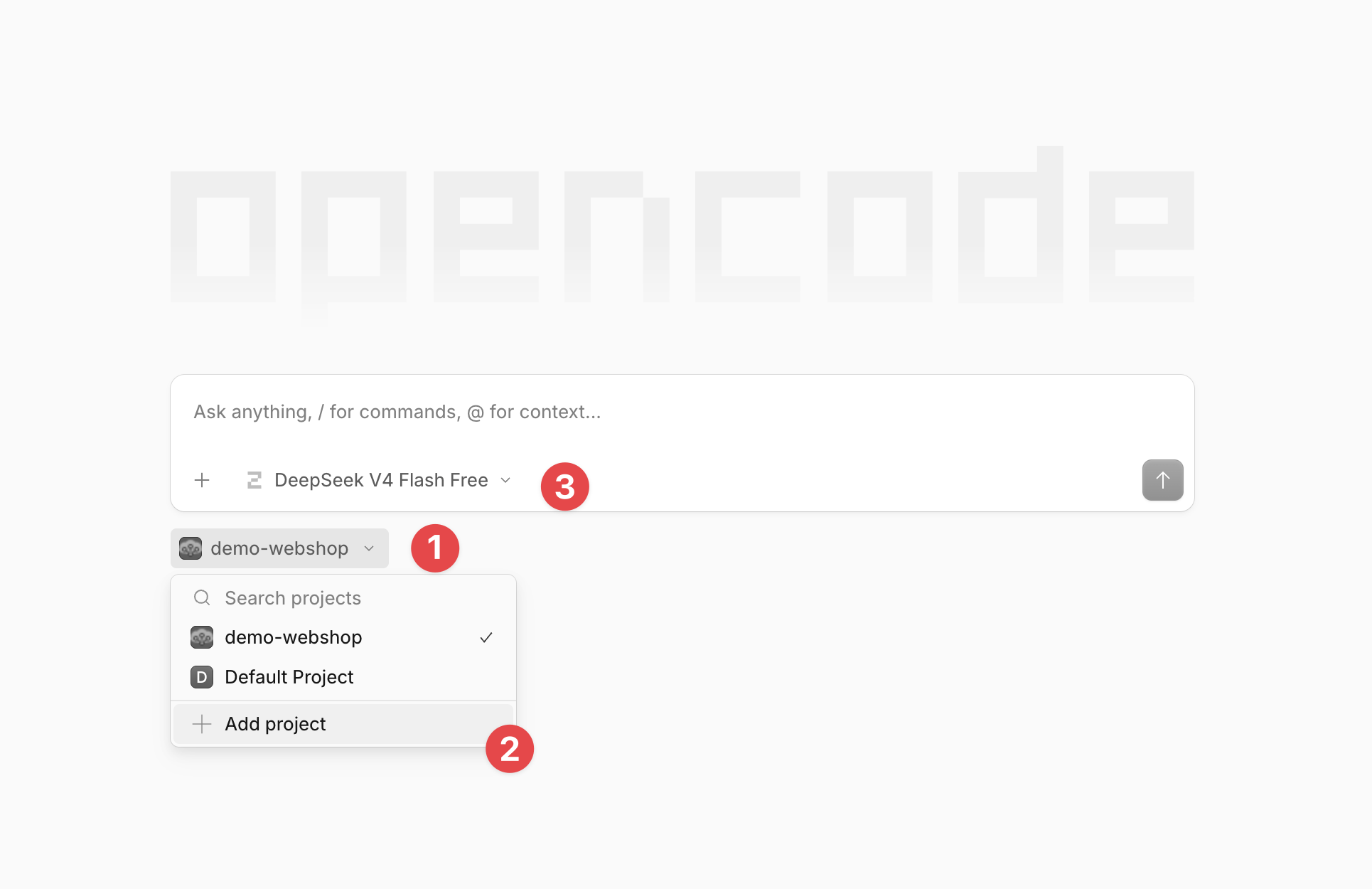
-
Verify the setup
Ask this question in the chat. It should list some agent skills:
List the agent skills available in this repository.